
- Guides
LinkedIn Profile Picture Tips: The Complete 2026 Guide
Ah, you’re one of the people who clicks on a year in the title. No judgment – it worked, here you are. Sorry about that. But we did genuinely try to make this the good one: the first-impression science, the round-crop reality nobody mentions, what to wear, the quiet mistakes, and where AI honestly fits.
Your LinkedIn photo sits next to your name in every search result, message and comment, and people form an opinion of it before they read a word. This guide is about what that photo needs to communicate and the platform quirks that decide whether it lands. The mechanics of light, framing and shooting live in how to take a professional headshot with your phone; we point you there instead of repeating it.
The 60-second version
The checklist first. Everything after it is the reasoning, which is what helps when the list doesn’t cover your case.
- Solo photo, face filling most of the frame – head and the top of the shoulders, not a full-body shot.
- Eyes on the lens, a small genuine smile. Hidden or averted eyes cost you the trust reading.
- Soft light from the front, no hard shadows. A window does this better than any gadget.
- A calm, uncluttered background that contrasts with your hair and clothes.
- Solid, well-fitted clothes in muted colours, at your industry’s level of formality.
- Recent and honestly you. It should match the person who walks into the meeting.
- Check it as a small circle – that is the size everyone else sees.
- None of the usual mistakes: sunglasses, cropped group photos, selfie-arm, heavy filters.
The rest of the guide is why each of these is on the list.
Why the photo does so much work
In 2006, Princeton psychologists Janine Willis and Alexander Todorov showed people faces for a tenth of a second and asked them to rate trustworthiness, competence, likeability, attractiveness and aggressiveness. Those 100-millisecond ratings correlated strongly with ratings from people given unlimited time. Longer exposure didn’t change the verdicts; it only made people more confident in them. Of all the traits, trustworthiness was judged fastest and most consistently.

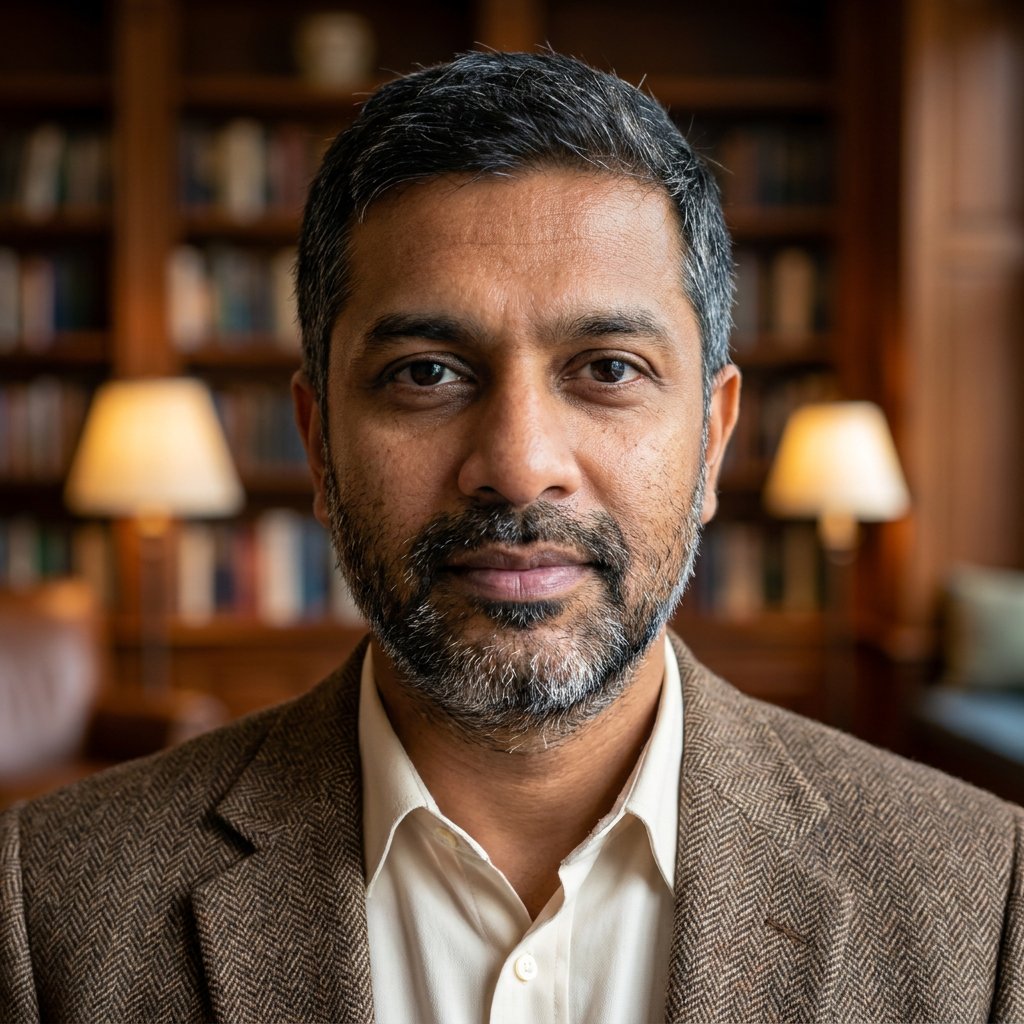
Test yourself
20 faces, a tenth of a second each. How much do you trust them?
The Willis & Todorov protocol, roughly: a fixation cross, a face for a tenth of a second, a verdict. Then the same face for as long as you like. Twenty people, twenty expressions – all AI headshots from our examples.
Social psychologists Fiske, Cuddy and Glick describe two dimensions people use to size up anyone they meet. Warmth is whether the person means well; competence is whether they can act on it. A recruiter scanning forty profiles, a prospect deciding whether to reply, a hiring manager forming an opinion before the interview. Each of them runs that appraisal on your photo, and most of this guide is about setting those two readings in your favour.
You will see large multipliers quoted – profiles with a photo get “14×” or “21×” more views, depending on which blog you read. Treat the exact number as folklore; nobody can hand you the study. The direction is real and uncontroversial: no photo, or a bad one, and people scroll past.
LinkedIn’s real canvas: a small circle, mostly on a phone
Most guides bury this. LinkedIn does not show your photo the way you framed it. It crops it to a circle, and it shows that circle small – about the width of a fingernail in the feed, in search results and in comments. Most people forming an impression of you see it at that size, on a phone, and never open the full version.
Two consequences follow:
- The corners are gone. Anything at the edge of a rectangular shot – a shoulder, a hand, half of the person you cropped out – is either cut off by the circle or sits at its rim. Compose for the circle: face in the centre, nothing important near the edges.

How you framed it versus how LinkedIn shows it. The corners – and anything you put in them – are gone.
- Detail is lost at small sizes. A subtle expression, a busy background, a dark top against a dark wall – none of it survives being shrunk to a few millimetres. Whatever the photo needs to say, it has to say plainly enough to read at that size.

Four photos at the size the feed actually shows them. Busy background, a top the same tone as the wall, a face small in the frame – all three turn to noise. The tight headshot is the only one that still reads.
There is also the banner. Your circular photo sits over the bottom-left of your background image. A busy banner competes with your face for attention; a calm one frames it. You don’t need to design a banner here – just remember the photo doesn’t live alone, and a loud banner behind it undoes careful work.

Same photo, two banners. Left: the banner competes with the face. Right: it frames it.
The specs: LinkedIn’s minimum is 400 × 400 pixels; aim for 800 × 800 or larger, JPG or PNG, under 8 MB. Resolution is the easy part – any phone from the last decade has more than enough. Composition for the circle is where people go wrong.
Expression: setting warmth and competence
Your expression is where the two readings above, warmth and competence, are set.
Warmth comes from a genuine, slight smile and relaxed eyes. A genuine smile and a posed one use different muscles: a real one contracts the ring of muscle around the eyes, which narrows them and creases the outer corners, while a held smile mostly moves the mouth. People read that difference without knowing they are reading it, even at thumbnail size. The photographer’s trick is to think of someone you are glad to see a second before the shot; the eyes follow. A closed-mouth smile, a warm neutral or a full smile all work, as long as the eyes are in on it. A held toothy smile with unengaged eyes usually reads worse than a relaxed non-smile.

Left, full smile: open, energetic, the choice for client-facing and people roles. Right, slight closed-mouth smile: calm and composed, and it survives the thumbnail better. Both read as genuine; the eyes are engaged in each.
Competence comes from the eyes and the jaw. The safer default is straight into the lens – a direct gaze reads as eye contact, a gaze slightly off the lens reads as looking past the viewer, which can work as “thoughtful” but rarely as “met”. A level, steady gaze and a defined jawline read as capable. Pushing the chin slightly forward and down tightens the jawline more than any editing does, even though it feels ridiculous while you are doing it.

Left, chin slightly down and forward: engaged, approachable, the jawline holds. Right, chin up: confident, but it tips toward looking down on the viewer. Both are usable; they say different things.
Where you set the balance depends on your field. A paediatric nurse or a community manager can lean into warmth – approachability is the competence signal there. A litigator, a CFO or a surgeon can lean toward composed authority with only a hint of a smile. Neither extreme wants the other missing: pure warmth with no authority reads as a nice person you wouldn’t hire; pure authority with no warmth reads as someone you would hire and then avoid.

The same face at three settings: warm and open, soft neutral, composed authority. Pick the one your field reads as competent.
Framing: where your face sits in the circle
Professional headshots are consistent on purpose, and LinkedIn’s crop makes that consistency non-negotiable:
- Fill most of the frame with your face – crop from the top of the shoulders to just above the head. A small face in the middle of a wide shot becomes unreadable once the circle shrinks it; a face that fills the frame reads at any size.
- Camera at eye level, or slightly above. From below, the chin and nostrils dominate and you appear to loom over the viewer; from above, the head looks large and the body small. Eye level reads as a peer.

The same man, the same circle. Left: a wide shot, the face is a small part of it. Right: cropped to head and shoulders, the face is the picture.
- Turn your shoulders slightly – 20 to 30 degrees off the camera – then turn your head back to the lens. Square shoulders make the torso look wide and flat, like an ID photo; the slight turn narrows the shoulders and adds depth.
- Centre your face in the circle, not the rectangle. Before you commit, imagine the round crop on the shot. If an eye or an ear is drifting toward a corner, it will be clipped.

Left, shoulders turned, head back to the lens: casual, confident, a person who looked up. Right, square to the camera: formal, closer to a passport photo. Both are usable; pick the register.
The mechanics of getting this with a phone – propping it at eye level, self-timer versus a friend, how many frames to take – are in the phone headshot guide. This section is the target that setup aims at.
What to wear
Clothes are a competence signal you fully control. The reliable rule: solid, muted colours, well fitted, contrasting with your background.
- Colour: navy, charcoal, grey, deep green and muted earth tones photograph as professional and keep attention on the face. The one hard constraint is contrast – if your top and the wall behind you are the same tone, your outline disappears at thumbnail size. Dark background, go a shade lighter on top; light background, go a couple of shades darker.

Same wall. Left: a top the same tone as the background, the outline of the shoulders goes. Right: a dark top on a light wall, the silhouette holds at any size.
- Avoid pure white and neon. White is usually the brightest thing in the frame, so it either clips to a flat block or the camera darkens everything else, including your face, to save it. Neon reflects its own colour onto the underside of your chin and jaw. If you like a white shirt, put a blazer or jacket over it for contrast.

Left: pure white under bright light clips to a flat block. Middle: neon bounces its own colour onto the chin and neck. Right: the same white shirt, contained by dark lapels.
- Patterns: keep them quiet. Fine checks and tight stripes interfere with the camera sensor’s pixel grid and produce moiré – wavy bands that weren’t in the fabric – and at small sizes any busy pattern turns into noise. Solids or a barely visible texture are safer.
- Fit matters more than usual because the frame is tight – collars, necklines and shoulders are most of what is visible, so baggy or straining fabric shows immediately.

The same fine check shirt, shrunk two ways. Left: a careful resize blurs the pattern into grey. Right: a careless one – or a camera sensor – lets the checks beat against the pixel grid, and you get moiré bands that were never in the fabric.
Then match the formality to your industry, because “professional” is not one thing. Finance, law and consulting still expect a suit, blazer or crisp button-down – formality is the signal there. Tech and startups read sharp smart-casual as more honest than a suit you clearly never wear. Creative fields tolerate, even reward, some personality – neat and deliberate, never careless. When unsure, aim one notch above what your team wears on a normal Tuesday.

One man, three registers. Suit and tie: finance, law, consulting. Plain dark knit: tech and most offices. Textured cardigan over black: creative, still deliberate. All three are professional; none of them is the only way to be.
Background and light (the short version)
Two essentials.
Background: plain and calm, contrasting with your hair, skin and clothes so your face stands out. A plain wall, a softly blurred room, a simple studio backdrop – all fine. What to avoid is clutter and context: bookshelves the viewer starts reading, a kitchen, another person’s arm left over from the original photo. At thumbnail size, a busy background is noise around your head.

Same man, same jacket. Left: bookshelf, kitchen, coat on a hook – at thumbnail size all of it becomes noise around the head. Right: a plain wall, and the face is all there is to read.
Light: soft and from the front. Daylight from a window you are facing is the easiest flattering light there is. Harsh overhead bulbs cast shadows into the eye sockets and under the nose. A bright window behind you makes the camera expose for the window, and your face goes dark. That is the whole principle.

Left: a ceiling light digs shadows into the eye sockets and under the nose. Middle: a window behind you – the camera exposes for the window and your face goes dark. Right: face the window, and the same daylight does the work.
Setting it up – which window, how to avoid your own shadow, when portrait-mode blur helps and when it hurts – is what the phone headshot guide covers step by step. No point repeating it here.
The mistakes that quietly cost you
None of these gets you rejected outright. Each removes a little credibility, and at a tenth of a second there is nothing else to fall back on. In rough order of how often we see them:
- The cropped group photo. Someone else’s shoulder, a stray arm, an obviously cut-out background. Even done cleanly, it shows that the photo was taken for something else. Use a photo taken to be your photo.
- Sunglasses, or hidden eyes. The eyes carry the trust signal. Cover them and the viewer cannot read you, and doesn’t trust what they cannot read.
- Selfie-arm. A phone at arm’s length is close enough that the lens enlarges whatever is nearest – the nose, the forehead – and the down-the-arm angle is unmistakable. Both read as casual, which is the one thing a professional photo shouldn’t. Even a phone shot should look like someone else took it.
- The outdated photo. If you look meaningfully different in the meeting than in the picture, the picture costs you trust instead of building it. Refresh it every few years, or after any real change in how you look.
- The heavy filter. Over-smoothed, poreless skin reads as fake at a glance – recruiters have seen enough AI-polished faces to be suspicious of one, and the tells are learnable. Edit with restraint or not at all.
- The low-res or blurry upload. Grainy, soft or visibly compressed reads as “doesn’t care” before it reads as anything else.
- The logo wall. A conference backdrop or a sponsor wall dates the photo and clutters the circle. Your face, not the sponsor’s.

Top: the cropped group photo, the sunglasses, the selfie-arm. Bottom: the low-res upload, the heavy filter, the logo wall. None of these is disqualifying on its own; each takes a little credibility off the top. The outdated photo isn’t here only because you can’t see age in one frame.
Can you use an AI headshot? The honest answer
We make an AI headshot product, so read this with the appropriate suspicion – but we would rather be straight with you than sell you something that backfires.
The trust question is real, and it has been measured. In a June 2024 Ringover survey of 1,087 US recruiters, 76.5% preferred the AI headshots over real photos in a blind comparison. Told which ones were AI, 66% said it would put them off, and 88% wanted candidates to disclose it. The photo itself wasn’t the problem; finding out was. LinkedIn’s own rule points the same way: in February 2026 it told CBS News that AI tools are allowed for profile photos, but the photo must “reflect your likeness” – not a synthetic person, not a version of you edited past recognition. An invented face, or one “improved” into someone you are not, breaks the platform’s rule and is a bad bet – the gap shows up on the first video call.
So where does AI legitimately fit? In the same place a studio photographer does: taking the real you and rendering it at professional quality. The line is simple. Does the result still unmistakably look like the person who shows up to the meeting? If yes, it doesn’t matter whether the polish came from a photographer’s lighting or a model’s inference. If no, you have created a problem for yourself at the first call.
The practical reality, per the same survey and the forums that debate the ethics: good paid tools now produce results most people cannot tell from a studio session (those recruiters spotted the AI photos 39.5% of the time), free tools still produce obvious artifacts – when they return an image at all – and the quality of what you get out depends heavily on the selfies you put in. That is the honest state of it in 2026.


The same face, rendered at studio quality by Close Enough. The test is whether it still looks like you – drag to check.
Our own take, for what it is worth: three phone selfies – the kind that guide teaches you to take – go in, and Close Enough turns them into 24 headshots across two looks (outfits and backgrounds you pick) in about five minutes, for $7 in 2K or $10 in 4K. If none of the 24 are usable and your selfies followed the guidelines, you email us within 14 days and we refund it. The whole thing is built so the output still looks like you at thumbnail size on a recruiter’s screen – which, as the rest of this guide argued, is the only size that counts.
FAQ
What size should my LinkedIn profile picture be?
At least 400 × 400 pixels; aim for around 800 × 800 or larger. JPG or PNG, under 8 MB. LinkedIn crops it to a circle and shows it small, so composing for that circle matters far more than chasing extra megapixels.
Do I need a professional photographer?
No. A photographer buys you lighting and direction, and if your face is the job – actor, executive, personal brand – it can be worth the price and the booking. For a normal LinkedIn refresh, a careful phone photo in good light clears the bar. Our phone headshot guide covers exactly how.
Is a phone photo good enough?
Yes, if the light and framing are right. LinkedIn compresses your photo into a small circle, so sharp eyes and a clean, contrasting background matter more than sensor size. The camera you own is almost certainly enough.
Should I smile with teeth?
Whatever’s genuinely yours. A real closed-mouth smile beats a forced toothy one, and a warm neutral beats a strained grin. The test is whether it looks like your actual face on a good day – not whether the teeth are showing.
Is it against LinkedIn’s rules to use an AI headshot?
The rule is that your photo must be a real likeness of you. AI-assisted polish that still looks unmistakably like you is fine in spirit; a fully synthetic face, or a heavily idealised one that no longer matches the person in the meeting, is not. Keep it recognisably you and you are on the right side of both the rule and the recruiters in the survey above.
How often should I update it?
Every two to three years, or sooner if you’ve meaningfully changed how you look. The photo’s job is to match the person who walks into the room – an out-of-date one quietly works against you.